
Built to take a beating. Built to be repaired.
Dell Technologies covers both ends of what we get asked for — Dell Pro laptops and desktops for offices running Windows 11 on Intel Core Ultra, and the Dell Education Series for schools, in either Windows or ChromeOS. We supply it, deploy it, and handle the warranty when something goes wrong.
Why we work with Dell.
Dell Technologies is one of the few vendors that can answer a whole organisation with one conversation — a business notebook, a desktop for reception, a workstation for the person doing the heavy work, the monitors in front of all of them, and a classroom device that costs a fraction of any of it. For us that means fewer quotes to assemble and one warranty process to run instead of four.
The education range is where Dell earns the relationship. Devices are tested to MIL-STD 810H, then past it: thousands of micro-drops, drops onto steel and plywood, hinge cycles in the tens of thousands, and top-and-bottom pressure tests for the textbooks that land on a laptop in a backpack. Sticker price is not what decides the cost of a school fleet — the failure rate in year two is.
Serviceability is the part that matters most to us, and it is the part vendors usually get wrong. Dell's education systems use captive screws on the back cover, screwless modular keyboards, and a battery that connects by cable and can be swapped without special tools or training. That is the difference between a device we fix in an afternoon and one that leaves the building for three weeks — and it is why a keyboard with popped keycaps stops being a replacement and starts being a repair.
On the management side, Dell fits the way we already work. The Dell Management Portal runs inside Microsoft Intune, so Dell hardware is managed from the same console as the rest of a Windows fleet rather than a second one nobody logs into; the Dell Device Management Console does the same for peripherals, and the Trusted Update Experience puts BIOS and driver updates on a published schedule. Security sits underneath it — Dell Trusted Workspace, SafeSupply Chain, SafeBIOS with the Trusted Device app, and SafeID for credentials held in hardware. Intune itself is a separate purchase.
At the end of the cycle the same pragmatism applies. Dell's education products carry ENERGY STAR certification, EPEAT Gold registration with Climate+ and the TCO Certified designation, and Dell will take the old fleet back for secure, documented retirement. Paired with a buy-back that gives you a sustainability position you can actually report, rather than one you intend to have.
The portfolio we supply
- Dell Pro laptops and desktops — the business range on Windows 11 and Intel Core Ultra, available as AI PCs and Copilot+ PCs.
- Dell Pro Education 11, 11 2-in-1 and 14 — Windows 11 classroom devices for schools that rely on Windows-native software and offline access.
- Dell Chromebook 11, 11 2-in-1 and 14 — the same chassis on ChromeOS, for schools working in Google Workspace for Education.
- Monitors and displays — from the Dell Pro 24 on a desk to the 75-inch 4K interactive touch display at the front of a classroom.
- Workstations — for creative and professional workloads that have outgrown a business notebook.
- Accessories and docks — headsets, mice, USB-C docks, sleeves and backpacks quoted with the machines rather than sourced separately after the fact.
Dell Education Series.
Four devices built for the same room: an 11-inch laptop and 2-in-1 for younger students who work with touch and a stylus, and a 14-inch laptop for senior students and staff who need the screen and the performance. Each comes in a Windows 11 version and a ChromeOS version on the same chassis, so a school can change platform without changing the way the devices are stored, charged or repaired.
They are specified for a classroom rather than a spec sheet: Wi-Fi 6E, Corning Gorilla Glass on the 2-in-1 displays, reinforced screens and raised bezels, spill-resistant keyboards with anchored keycaps, dual microphones, and an optional world-facing camera on the 2-in-1 for when the device has to be pointed at something.
School procurement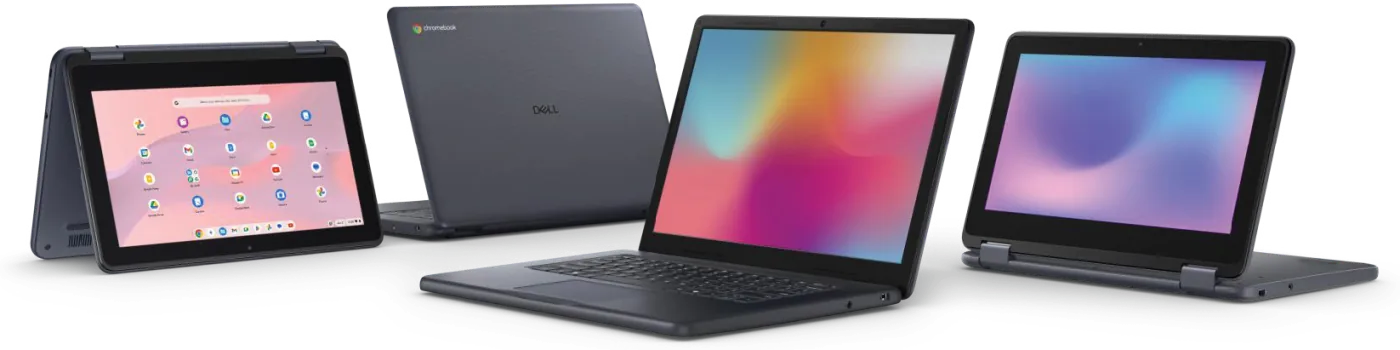
The right answer is rarely the same device for everyone.
Tell us who is using it and what they do all day, and one of these three is the answer. The split that matters in a school is usually not price — it is whether the software you rely on runs offline and natively on Windows, or lives in Google Workspace.
Dell Pro
The business range — laptops and desktops on Windows 11 with Intel Core Ultra, available as AI PCs for everyday AI acceleration or Copilot+ PCs where the work justifies on-device performance. Dell quotes up to 34% better productivity performance against a four-year-old PC, which is the comparison that actually matters when you are deciding whether to refresh.
Dell Pro Education
Windows 11 on the 11-inch laptop and 2-in-1 and the 14-inch laptop, with Intel N-series processors, up to 8GB of memory and 128GB UFS or a 256GB SSD. This is the one to pick when the classroom depends on Windows applications or has to keep working without a connection.
Dell Chromebook
The same chassis running ChromeOS, on Intel N-series or MediaTek Kompanio 540, with 64GB eMMC onboard and 5G available as an option on the 11-inch. Pick it where students work in Google Workspace for Education and Android apps, and where a fast, hands-off device refresh matters more than local software.
The tests that map to what actually happens.
Most durability marketing tests the dramatic failure. Dell tests the boring one — the repeated knock, the hinge, the weight of a bag. Those are the faults we see, and they are the ones that turn into a repair queue in term three.
- 3,000+
Micro-drops
Roughly 10 cm drops on all six flat surfaces and all four corners. The jostling in a backpack and the slide across a desk, repeated until hairline cracks, loose connections and intermittent faults would have shown up.
- 76 & 122 cm
Drops onto hard floors
Onto steel and onto plywood, because classroom floors are concrete, tile and asphalt rather than carpet — the surfaces a device meets on the walk between home and school.
- Up to 60,000
Hinge cycles
Opened and closed at 180° and, on the 2-in-1s, right through 360°. Students carry a laptop by the lid and flip the screen dozens of times a day, and a loose hinge takes a device out of circulation as surely as a broken screen.
- Up to 25 kg
Pressure
Top and bottom compression, for textbooks stacked on a bag and devices stacked in a charging cart. This is the test that catches cracked screens and warped chassis before they become a warranty claim.
Figures are Dell's own, from internal analysis dated August 2025 and February 2026, and vary by model — the 60,000-cycle hinge result is the 11-inch systems, where the 14-inch models are tested to 30,000. Published in inches and pounds; converted here.
Everything a Dell fleet touches.
Hardware is the order. These are the services either side of it — what happens before the devices land, and what happens to the ones they replace.
Hardware supply
Dell Pro laptops, desktops and monitors quoted against the workload in front of us, not a catalogue page.
School procurement
Dell Pro Education and Dell Chromebook sized for 1:1 and shared programs, landed with the charging and storage that goes around them.
Windows fleet enrolment
New Dell hardware enrolled in Intune and configured before it reaches a desk, so the first login is the finished state.
Refresh and buy-backs
The other end of the cycle — residual value on the outgoing fleet put back against the cost of the incoming one.
Frequently asked questions
What Dell products do you actually supply?
The commercial and education portfolio: Dell Pro laptops and desktops, Dell Pro Education and Dell Chromebook devices, workstations, monitors and displays, docks, headsets, mice, sleeves and backpacks. Tell us the workload and we will tell you which of those is the right answer — including when the right answer is not the most expensive one.
Dell Pro Education or Dell Chromebook — which should a school pick?
It comes down to software, not hardware: the two ranges share a chassis and the same durability testing. Choose Dell Pro Education and Windows 11 if your classrooms depend on Windows-native applications or need to keep working offline. Choose Dell Chromebook and ChromeOS if students live in Google Workspace for Education and Android apps. If you are genuinely unsure, we would rather walk through your actual subject software with you than guess — that conversation is free.
How durable are they really?
Dell tests its education systems to MIL-STD 810H and then past it — 3,000-plus micro-drops, drops onto steel and plywood, up to 60,000 hinge cycles depending on model, and up to about 25 kg of top-and-bottom pressure. In practice that is the reason we are comfortable putting them into a 1:1 program where the device travels home every night. No laptop is unbreakable; the point is that the common faults have been engineered against rather than warranted against.
What happens when one does break?
Better than most, because the devices were designed to come apart. The battery connects by cable and can be replaced without specialist tools, the back cover uses captive screws that stay with the panel, and the keyboard is modular and screwless — so a spilled drink or a picked-off keycap is a keyboard swap rather than a mainboard job. For fleets we have supplied, the warranty and repair process is ours to run, not yours; see lifecycle services for how that works across the life of a fleet.
We manage everything in Intune. Do Dell devices fit that?
Yes, and more directly than most. The Dell Management Portal is accessible from inside Microsoft Intune, so Dell-specific management — including fleet-wide BIOS settings — happens in the console your team already uses. The Dell Device Management Console covers peripherals, and the Trusted Update Experience puts BIOS and driver releases on a published schedule so updates can be planned instead of discovered. Intune is a separate purchase from Microsoft; we can set both ends up — see Intune deployment.
We have a sustainability commitment. Where does Dell sit?
Dell's education products are ENERGY STAR certified, EPEAT Gold registered with Climate+ and carry the TCO Certified designation, and the modular, serviceable design is itself the environmental argument — a keyboard swap is not a new laptop. Dell will also take back your outgoing equipment regardless of brand for secure, documented retirement. Paired with a buy-back on the fleet being replaced, that gives you something defensible to report.
Can you supply the charging and storage as well?
Yes — and we would rather quote it with the devices than after them. Dell's own education accessory range covers headsets, mice, USB-C docks, sleeves and backpacks, and we pair the fleet with charging trolleys and lockers from PC Locs so a 1:1 or shared program has somewhere to live on day one rather than in week four.